
Listening to a CD
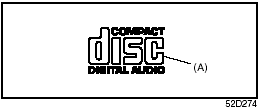
• CDs or CD-ROMs carrying no mark (A) cannot be used.
• Some discs previously recorded in CDR\ CD-RW format may not be used.
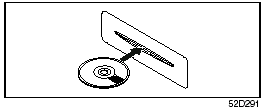
• A CD is inserted with its label facing upward.
• When there is a CD already loaded in the unit, another CD cannot be loaded at the same time. Do not use force when inserting the CD into the CD insertion slot.
• If a blank disc (non recorded CD-R) is loaded in the unit, the disc will be ejected.
CAUTION:
• Never insert your finger or hand
into the CD insertion slot. Never
insert foreign objects.
• Never insert a CD with glue coming out from adhesive tape or a rental CD label or with a trace indicating that adhesive tape or a rental CD label has been removed. This may cause the CD not to eject or result in a malfunction.
See also:
Vehicle Cleaning
WARNING:
When cleaning the interior or exterior
of the vehicle, NEVER USE flammable
solvents such lacquer thinners, gasoline,
benzene or cleaning materials
such as bleaches and strong househol ...
Safety
Suzuki also takes advantage of Nissan electronic controls, such as active
limited-slip traction control, electronic stability system, hill descent control
and hill start assist. Hill descent contr ...
Vehicle Loading
Your vehicle was designed for specific
weight capacities. The weight capacities of
your vehicle are indicated by the Gross
Vehicle Weight Rating (GVWR), the Gross
Axle Weight Rating (GAWR, front ...