
Lighting / Turn Signal Control Lever
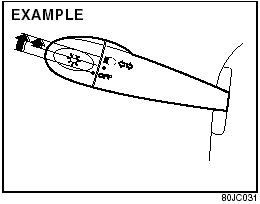
Lighting Operation
To turn the lights on or off, twist the knob on the end of the lever. There are three positions: in the “OFF” position all lights are off; in the middle position the front parking lights, taillights, license plate light, and instrument lights are on, but the headlights are off; in the third position the headlights come on in addition to the other lights.
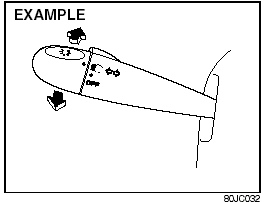
With the headlights on, push the lever forward to switch to the high beams (main beams) or pull the lever toward you to switch to the low beams. When the high beams (main beams) are on, a light on the instrument panel will come on. To momentarily activate the high beams (main beams) as a passing signal, pull the lever slightly toward you and release it when you have completed the signal.
Daytime Running Light (D.R.L.) System
The headlights light, but are dimmer than the low beam, when the following three conditions are all met. Also, the D.R.L. indicator light on the instrument panel comes on.
Conditions for D.R.L. system operation: 1) The engine is running.
2) The parking brake is released.
3) The lighting switch is at either the “OFF” or the “Middle” position.
NOTE:
Be sure to turn the lighting switch to the
third position at night or at any time of the
day when driving or weather conditions
require the headlights to operate at full
brightness and the taillights to be on.
Lights “On” reminder (if equipped)
A buzzer/chime sounds to remind you to turn off the lights if they are left on when the ignition key is removed and the driver’s door is opened.
Turn Signal Operation
With the ignition switch in the “ON” position, move the lever up or down to activate the right or left turn signals.
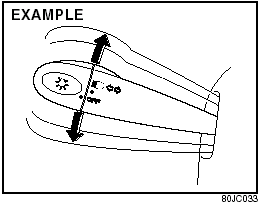
Normal turn signal
Move the lever all the way upward or downward to signal. When the turn is completed, the signal will cancel and the lever will return to its normal position.
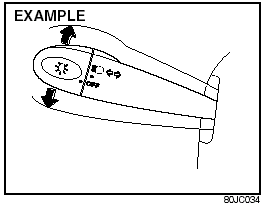
Lane change signal
Some times, such as when changing lanes, the steering wheel is not turned far enough to cancel the turn signal. For convenience, you can flash the turn signal by moving the lever part way and holding it there. The lever will return to its normal position when you release it.
See also:
Door Locks
WARNING:
Always lock all doors when driving.
Locking the doors helps to prevent
occupants from being thrown from
the vehicle in the event of an accident.
It also helps prevent unintended
openin ...
Wiper Blades
If the wiper blades become brittle or damaged,
or make streaks when wiping,
replace the wiper blades.
To install new wiper blades, follow the procedures
below.
CAUTION:
To avoid scratching or ...
Location of Warning Messages
Read and follow all of the warnings (labels
etc.) on your vehicle. Make sure you
understand all of them. Keep them on the
vehicle. Do not remove the messages for
any reason. If a label comes off o ...