
Listening to a CD

• CDs or CD-ROMs carrying no mark (A) cannot be used.
• Some discs previously recorded in CDR\ CD-RW format may not be used.
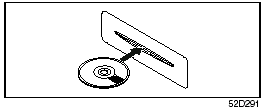
• A CD is inserted with its label facing upward.
• When there is a CD already loaded in the unit, another CD cannot be loaded at the same time. Do not use force when inserting the CD into the CD insertion slot.
• If a blank disc (non recorded CD-R) is loaded in the unit, the disc will be ejected.
CAUTION:
• Never insert your finger or hand
into the CD insertion slot. Never
insert foreign objects.
• Never insert a CD with glue coming out from adhesive tape or a rental CD label or with a trace indicating that adhesive tape or a rental CD label has been removed. This may cause the CD not to eject or result in a malfunction.
See also:
Instrument Cluster
Instrument Cluster
1. Speedometer
2. Odometer/Tripmeter
3. Odometer/Tripmeter selector and meter illumination cancel knob
4. Tachometer
5. Fuel gauge
6. Temperature gauge
7. Warning and indic ...
New for 2011
All models gain standard rear side airbags, giving the SX4 eight airbags in
total. A new Anniversary Edition of the sedan includes 17-inch alloy wheels,
rear disc brakes, remote keyless entry and ...
2010 Suzuki SX4 review By Kelsey Mays
Suzuki's SX4 has a sense of urban nimbleness that makes even its sportiest
competitors seem hefty in comparison, but there are a lot of nagging issues
weighing the car down. Some city drivers may ...