
Speedometer/Odometer/Trip meter
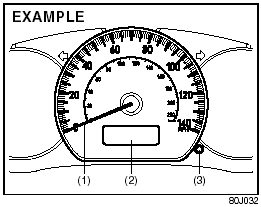
Speedometer/Odometer/Trip meter
(1) Speedometer
(2) Odometer/Trip meter
(3) Indication selector knob
Speedometer
The speedometer indicates vehicle speed in MPH.
Odometer/Trip meter
When the ignition switch is turned to “ON”, the display shows the odometer or trip meter. The odometer records the total distance the vehicle has been driven. The trip meter can be used to measure the distance traveled on short trips or between fuel stops.
CAUTION:
Keep track of your odometer reading
and check the maintenance schedule
regularly for required services.
Increased wear or damage to certain parts can result from failure to perform required services at the proper mileage intervals.
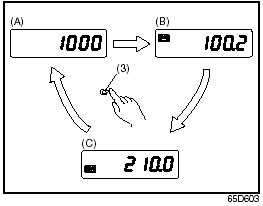
When the ignition switch is turned to “ON” with the lighting switch is in the “OFF” position, the display shows three types of indication; odometer (A), trip meter A (B) and trip meter B (C). Push the selector knob (3) quickly to switch the indication among the three.
You can use the two trip meters (A and B) independently.
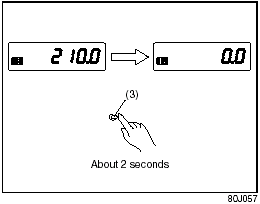
Hold in the selector knob for about 2 seconds to reset the trip meter to zero.
See also:
Interior Light Switch
Center
Rear
This light switch has three positions which
function as described below:
(1) The light comes on and stays on
regardless of whether the door is
open or closed.
(2) The light come ...
A/T Selector Position Indicator (if equipped)
A/T Selector Position Indicator (if equipped)
When the ignition switch is in the “ON”
position, this indicator shows the selector
position of automatic transaxle. ...
Braking
Braking
The distance needed to bring any vehicle
to a halt increases with the speed of the
vehicle. The braking distance needed, for
example, at 60 km/h (37 mph) will be
approximately 4 times g ...